
BAJUBESI.ORG
You are using an out of date browser. It may not display this or other websites correctly.
You should upgrade or use an alternative browser.
You should upgrade or use an alternative browser.

BChat 0.8.6
No permission to download
-
Author
Belon

- Creation date
Version
v0.6.0Released
11 Nov 2026Platform
Windows 10/11Price
Free, no ads
BChat 0.6.0 connects in more ways, keeps you safer, lets you set each tab your way, and is a quarter smaller.
What's new
- More ways to connect: several ports per server (
host/+6697,7000, tried in random order, the next one when one fails), secure WebSocket servers (wss://host/path), STARTTLS, IPv4 or IPv6 only, and If this address is gone (VPN off), don't connect at all. Server features: Choose... turns single IRCv3 features off per network- Safer logins: SCRAM-SHA-256 is used whenever the server offers it, so your password is never sent, not even on plain ports, and the server has to prove it knows it
- Settings for each tab: right-click a tab for its own timestamps, nick colours, join and part lines (show, short or hide), beep, flash, pop-up cards and logging
- Flood settings: how fast BChat sends, and limits for CTCP, new private chats and WhoIs, so a flood can't get you kicked or fill your screen (Preferences → Network → Flood)
- Lock BChat with a password (Preferences → BChat → Lock): only chosen channels, no private chats, no file transfers. Handy for a shared or family PC. Portable mode keeps everything next to the program
- Friends online instantly on servers with WATCH (UnrealIRCd and others), now also when a friend goes away or comes back
- DCC trust list: accept files and chats from people you trust without being asked; everyone else still asks
- URL Grabber: newest on top, who posted each link and where, search, notes, keep the list after BChat closes, and catch email addresses if you want
- Smaller and the same speed: the installer is 34 MB instead of 46 MB (unused Qt parts left out)
- Also: channel notices land in their channel,
/ban -aand/kickban -aban by account, start options-s server -j #channel -n nick
[/L#channelENTER][/CENTER]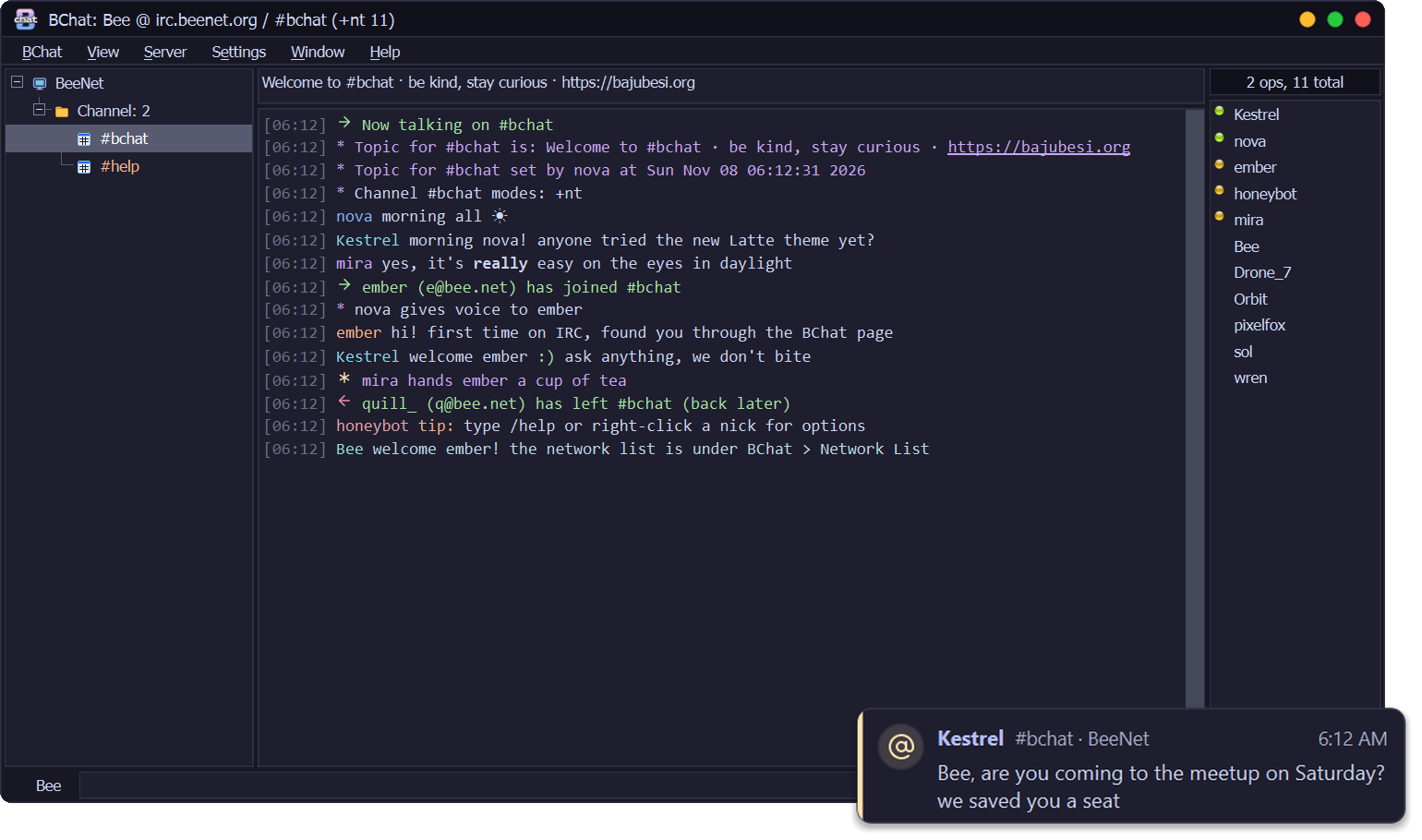
Already using BChat?
BChat 0.1.0 to 0.5.0 offer this update by themselves: look for Update after Help. It checks the signature and installs when you quit.First install
DownloadBChat-0.6.0-setup.exefrom this release and run it. The installer isn't code-signed yet, so Windows SmartScreen may warn you: choose More info → Run anyway. Some antivirus programs may also stop it; see the README.
VirusTotal: none of the 70 antivirus engines that scanned the installer found anything.
Questions or problems?
Ask in the release thread or BChat Support. BeeServ answers from the BChat guide.
Free, no ads. If you like it: support BChat on Ko-fi.
 BChat 0.6.0 is here
 Handle IRC as a bee does a flower
v0.5.0
11 Nov 2026
Windows 10/11
Free, no ads
BChat 0.5.0 looks after your channels, tells you more without getting noisy, and gets a bigger icon.
- Auto-Op, Auto-Voice & Protect: give @ or + to people by their NickServ account or address, even without ChanServ (Window → Auto-Op & Protect, or the nick menu). Protect gives it back if someone takes it, and lifts bans on them. It never kicks, waits behind ChanServ, and stops by itself before an op war
- Tray menu with your chats: right-click the tray icon to see every channel and private chat, with unread counts, and jump straight in. An Away tick for every network, and BChat can now start in the tray
- More notification cards, with a soft sound: when you're kicked, a network drops, a friend comes online, someone invites you or offers a file. One quiet chime (or a bee buzz), at most every 10 seconds and never while you game. Choose how long cards stay
- Friends List extras: how long each friend has been online, a note per friend (shared with the Address Book), and their own pop-up, sound and WhoIs
- A bigger icon: the honey tile fills the taskbar and tray like other apps, and the title bar logo is bigger
BChat 0.1.0 to 0.4.0 offer this update by themselves: look for Update after Help. It checks the signature and installs when you quit. Windows may show the old icon for a while; it changes after a restart.
DownloadBChat-0.5.0-setup.exefrom this release and run it. The installer isn't code-signed yet, so Windows SmartScreen may warn you: choose More info → Run anyway. Some antivirus programs may also stop it; see the README.
VirusTotal: 67 of the 68 antivirus engines that scanned the installer found nothing. DeepInstinct, an AI engine that judges files by their shape, flagged it; it passed 0.4.0, nothing in how BChat is packed changed, and we've reported it to Deep Instinct as a false alarm.
Ask in the release thread or BChat Support. BeeServ answers from the BChat guide.
v0.4.0
11 Nov 2026
Windows 10/11
Free, no ads
BChat 0.4.0 knows when you're behind a bouncer, logs in without a password, and makes ChanServ easy, with the new bee hexagon logo.
- Bouncer detection: BChat knows when it's talking to ZNC, soju or psyBNC and says so once. What ZNC plays back shows under one grey line with the times it was really said, then Now live, so nothing shows twice. Hover the network to see the bouncer and how long you've been online
- Log in with a certificate (SASL EXTERNAL): no password stored or sent. Make New makes one on your PC, Add to NickServ registers it, and BChat logs in with it from then on
- ChanServ Access in the nick menu: give someone auto-op (@) or auto-voice (+), or take it away, without typing services commands. BChat shows what they have now and the exact line it sends (Anope and Atheme)
- Skip the server's welcome message and short join and part lines, both off until you turn them on
/partallleaves every channel at once,/onlineshows how long you've been connected,/motdshows the welcome message any time- New logo: the BajuBesi bee hexagon, on the app, the taskbar and the installer
BChat 0.1.0, 0.2.0 and 0.3.0 offer this update by themselves: look for Update after Help. It checks the signature and installs when you quit.
DownloadBChat-0.4.0-setup.exefrom this release and run it. The installer isn't code-signed yet, so Windows SmartScreen may warn you: choose More info → Run anyway. Some antivirus programs may also stop it; see the README.
VirusTotal: none of the 66 antivirus engines that scanned the installer flagged it.
Ask in the release thread or BChat Support. BeeServ answers from the BChat guide.
v0.3.0
9 Nov 2026
Windows 10/11
Free, no ads
BChat 0.3.0 adds the tools mIRC users reach for every day, plus modern IRC's replies and typing, while keeping the calm XChat 2 look.
- One-click problem reports: after a crash or a freeze BChat offers to send a report, and Help → Report a Problem... sends one any time. You see what is sent first; nicks, channels, addresses and passwords are replaced, and chat text is never included
- Daily logs and a Logs window: a new log file every day, Window → Logs... to read and search them, and an optional clean-up of old days. Logging stays off until you turn it on, and BChat asks how long to keep them
- Nick colours by nick, address or host, and an Address Book with notes for the people you know
- Channel Central: topic, modes, bans, exceptions and invites in one window (double-click in a channel's text, or
/channel)- /timer and /alias, with
$1,$2-,$nick,$chanand|- Reply to a line (right-click, or
Alt+R) and see who is typing, on networks that support it. Showing your own typing is off until you turn it on- Double-click a nick in the nick list to open a private chat, like mIRC
- Start with Windows puts itself back if something removed it
BChat 0.1.0 and 0.2.0 offer this update by themselves: look for Update after Help. It checks the signature and installs when you quit.
DownloadBChat-0.3.0-setup.exefrom this release and run it. The installer isn't code-signed yet, so Windows SmartScreen may warn you: choose More info → Run anyway. Some antivirus programs may also stop it; see the README.
VirusTotal: none of the 70 antivirus engines that scanned the installer flagged it.
Ask in the release thread or BChat Support. BeeServ answers from the BChat guide.