
BAJUBESI.ORG
You are using an out of date browser. It may not display this or other websites correctly.
You should upgrade or use an alternative browser.
You should upgrade or use an alternative browser.

BChat 0.9.3
No permission to download
-
Author
Belon

- Creation date
Version
v0.9.3Released
27 Nov 2026Platform


Price
Free, no ads
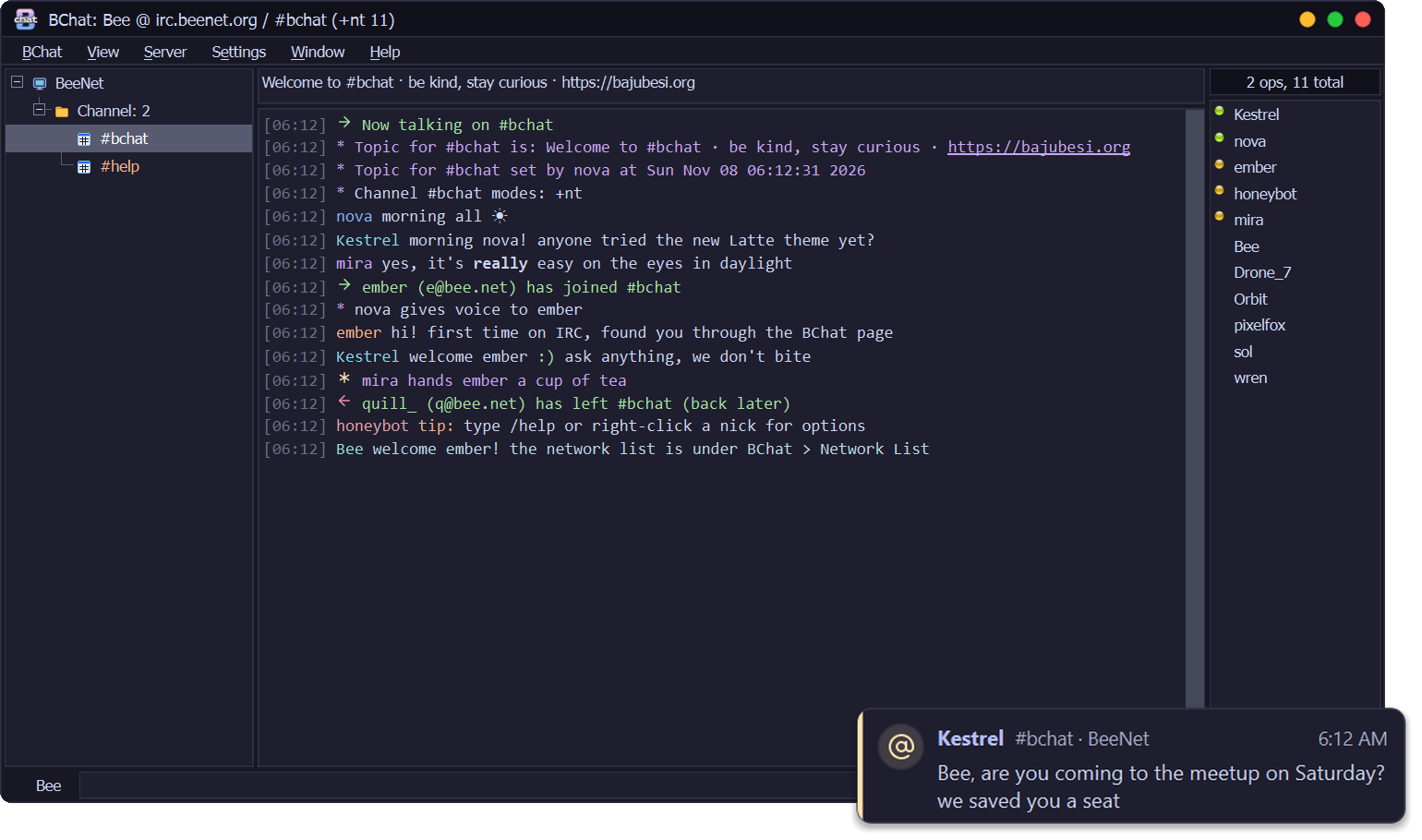
BChat 0.9.3 adds add-ons you can switch on or off: Channel Protection for the channels you run, and Oper tools for IRC operators.
What's new
- Add-ons (Settings → Add-ons…): switch Channel Protection and Oper tools on or off.
- Channel Protection (off until you turn it on): watches channels where you're an op for floods, repeats, caps, colours, CTCP and notice floods, nick floods, mass joins, clones and bad words. For each one you choose warn, kick or kickban, with a timed unban and kick reasons you can edit. Service bots are left alone.
- Oper tools (shown only while you're an IRC operator): an Oper menu and an Oper submenu on a nick, with Kill and Ban dialogs that send the right command for your server, a Server bans window, Oper settings, Wallops and Global notice. On networks run by services, the Global notice goes through the services, the Server bans window reads their AKILL, ZLINE and SHUN lists, and your own wallops show even when you don't have +w.
- A (notices) tab is now the first row under each network, so server notices no longer sit among your private chats.
Changed
- New tree icons (server, folder, channel, person, notices) in your theme's colours, easy to read on light and dark themes.
Already using BChat?
BChat 0.1.0 to 0.9.2 offer this update by themselves: look for Update after Help. It checks the signature and installs when you quit (Windows) or replaces the AppImage in place (Linux). The Flatpak is updated by your software centre.First install
Windows: downloadBChat-0.9.3-setup.exefrom this release and run it. The installer isn't code-signed yet, so Windows SmartScreen may warn you: choose More info → Run anyway. Some antivirus programs may also stop it; see the README.
Linux (AppImage): downloadBChat-x86_64.AppImage, put it in your home folder (for example~/Applications), make it runnable (right-click → Properties → Allow executing as a program, orchmod +x BChat-x86_64.AppImage) and start it. Keep it where you can write to it, so updates can replace it.
Linux (Flatpak): downloadBChat-0.9.3.flatpakand runflatpak install --user BChat-0.9.3.flatpak(it fetches the KDE runtime from Flathub the first time), then start BChat from your app menu.
VirusTotal: 1 of the 69 antivirus engines that scanned the Windows installer flags it (DeepInstinct, a machine-learning guess); the other 68 find nothing. Inside it, BChat.exe is flagged by 2 of 70 (Zillya and APEX, the same guesses they have made on earlier BChat builds). All three are reported to the vendors as false positives. The Linux AppImage: 0 of 63. The Flatpak bundle: 0 of 58.
Questions or problems?
Ask in the release thread or BChat Support. BeeServ answers from the BChat guide.
Free, no ads. If you like it: support BChat on Ko-fi.
 Handle IRC as a bee does a flower
 Download for Linux
v0.9.2
26 Nov 2026
Free, no ads
BChat 0.9.2 lets you choose whether a channel tab stays open after you're kicked or after you leave the channel.
- Keep the channel tab open when I'm kicked and Keep the channel tab open when I leave it (Settings → General). Both are on, as before. Turn one off and the tab closes, and the line about it goes to the server tab. While Rejoin after a kick is on, the kick box is greyed out and ticked, because BChat needs the tab to rejoin.
- A channel you were kicked from still joins again by itself after a reconnect, even when its tab was closed. A channel you left on purpose stays out.
- Options you can't use right now (greyed out) now have grey text everywhere in BChat, so they're easier to tell apart.
BChat 0.1.0 to 0.9.1 offer this update by themselves: look for Update after Help. It checks the signature and installs when you quit (Windows) or replaces the AppImage in place (Linux). The Flatpak is updated by your software centre.
Windows: downloadBChat-0.9.2-setup.exefrom this release and run it. The installer isn't code-signed yet, so Windows SmartScreen may warn you: choose More info → Run anyway. Some antivirus programs may also stop it; see the README.
Linux (AppImage): downloadBChat-x86_64.AppImage, put it in your home folder (for example~/Applications), make it runnable (right-click → Properties → Allow executing as a program, orchmod +x BChat-x86_64.AppImage) and start it. Keep it where you can write to it, so updates can replace it.
Linux (Flatpak): downloadBChat-0.9.2.flatpakand runflatpak install --user BChat-0.9.2.flatpak(it fetches the KDE runtime from Flathub the first time), then start BChat from your app menu.
VirusTotal: none of the 68 antivirus engines that scanned the Windows installer flags it. Inside it, BChat.exe is flagged by 1 of 70 (APEX, the same guess it has made on earlier BChat builds). The Linux AppImage: 1 of 62 (Microsoft, a machine-learning guess). The Flatpak bundle: 0 of 61.
Ask in the release thread or BChat Support. BeeServ answers from the BChat guide.
v0.9.1
26 Nov 2026
Windows 10/11
Free, no ads
BChat 0.9.1 adds a Flatpak build for Linux, and fixes one bug on all platforms.
- Closing a tab or window while BChat was still looking up a server name could cause an error a few seconds later.
BChat as a Flatpak
BChat-0.9.1.flatpakinstalls BChat in its own sandbox, next to your other Flatpak apps. BChat will also come to Flathub, where your software centre can find it.- Updated by your software centre: in the Flatpak, BChat doesn't update itself, so Check for Updates and the Updates settings page are hidden.
- Start when I log in asks your desktop once for permission.
- Received files go to your Downloads folder by default.
- Speech (reading messages aloud) uses your desktop's speech service (speech-dispatcher) and the voices installed on your system.
BChat 0.1.0 to 0.9.0 offer this update by themselves: look for Update after Help. It checks the signature and installs when you quit (Windows) or replaces the AppImage in place (Linux).
Windows: downloadBChat-0.9.1-setup.exefrom this release and run it. The installer isn't code-signed yet, so Windows SmartScreen may warn you: choose More info → Run anyway. Some antivirus programs may also stop it; see the README.
Linux (AppImage): downloadBChat-x86_64.AppImage, put it in your home folder (for example~/Applications), make it runnable (right-click → Properties → Allow executing as a program, orchmod +x BChat-x86_64.AppImage) and start it. Keep it where you can write to it, so updates can replace it.
Linux (Flatpak): downloadBChat-0.9.1.flatpakand runflatpak install --user BChat-0.9.1.flatpak(it fetches the KDE runtime from Flathub the first time), then start BChat from your app menu.
VirusTotal: none of the 69 antivirus engines that scanned the Windows installer flags it. Inside it, BChat.exe is flagged by 1 of 70 (APEX). The Linux AppImage: 0 of 63. The Flatpak bundle: 0 of 61.
Ask in the release thread or BChat Support. BeeServ answers from the BChat guide.
v0.9.0
25 Nov 2026
Windows 10/11
Free, no ads
BChat 0.9.0 comes to Linux: one AppImage file, no install and no admin password. Windows users get the same BChat as 0.8.10 with one small fix under the hood.
- One file:
BChat-x86_64.AppImageruns on Ubuntu 22.04 or newer, Fedora and other current 64-bit distros.- Passwords in your desktop's keyring (GNOME Keyring, KDE Wallet or KeePassXC), listed as BChat IRC passwords. If no keyring answers, BChat says so and keeps no passwords at all; it never writes them to a file.
- Feels at home: an app menu entry,
irc://andircs://links open in BChat, and Start when I log in (Settings → Preferences → General)./npshares what your music player is playing (any player that speaks MPRIS; turn it on in Settings → Preferences → Now Playing),/sysinfoshows your distro and kernel, and Speech (Settings → Preferences → Sound) reads messages aloud with your desktop's voices.- Updates itself like the Windows version: the AppImage file is replaced in place, so your menu entry and shortcuts keep working. Windows and Linux updates are signed apart, so neither can be passed off as the other.
- Log replay and search read dates the same on every Python version, and a 29 February line no longer trips them.
On Windows, BChat 0.1.0 to 0.8.10 offer this update by themselves: look for Update after Help. It checks the signature and installs when you quit.
Windows: downloadBChat-0.9.0-setup.exefrom this release and run it. The installer isn't code-signed yet, so Windows SmartScreen may warn you: choose More info → Run anyway. Some antivirus programs may also stop it; see the README.
Linux: downloadBChat-x86_64.AppImage, put it in your home folder (for example~/Applications), make it runnable (right-click → Properties → Allow executing as a program, orchmod +x BChat-x86_64.AppImage) and start it. Keep it where you can write to it, so updates can replace it.
VirusTotal: 1 of the 69 antivirus engines that scanned the Windows installer flags it (DeepInstinct, a machine-learning guess it has made on earlier BChat builds too; reported to them as a false positive); the other 68 find nothing. Inside it, BChat.exe is flagged by 2 of 70 (APEX and Zillya, the same guesses as on earlier builds). The Linux AppImage: 0 of 63.
Ask in the release thread or BChat Support. BeeServ answers from the BChat guide.
v0.8.10
24 Nov 2026
Windows 10/11
Free, no ads
BChat 0.8.10 lets you decide who may send you files and direct chats, gives File transfers its own place in Settings, and adds a few small commands.
- File transfers has its own group in Settings: Settings → File transfers now holds Options (everything about sending and receiving) and Trusted people.
- Who may send you files and direct chats (Settings → File transfers → Options): File offers and Direct chat offers each have their own menu:
- Ask me: BChat asks every time, as before.
- Accept from trusted people: people on your Trusted people list are accepted by themselves, everyone else is asked.
- Accept from everyone.
- Ignore them: the offer is dropped and leaves one grey line in the server tab, at most once a minute per person.
/sreq(files) and/creq(direct chats) set the same menus:ask,trusted,autoorignore.- Proxy "Not for:" (Settings → Network setup, shown when a proxy is set): servers listed here connect directly, without the proxy. Wildcards such as
*.localwork; separate entries with commas or spaces.
/updatenlreloads the nick list of the channel you're in./queryrn oldnick newnickrenames a private tab./timer1 5 1 /echo hiand/timer1 off: timers can have a number or a name (/timer<name>).
BChat 0.1.0 to 0.8.9 offer this update by themselves: look for Update after Help. It checks the signature and installs when you quit.
DownloadBChat-0.8.10-setup.exefrom this release and run it. The installer isn't code-signed yet, so Windows SmartScreen may warn you: choose More info → Run anyway. Some antivirus programs may also stop it; see the README.
VirusTotal: 1 of the 69 antivirus engines that scanned the installer flags it (DeepInstinct, a machine-learning guess it has made on an earlier BChat build too); the other 68 find nothing. Inside it, BChat.exe is flagged by 2 of 70 (APEX and Zillya, the same guesses as on earlier builds).
Ask in the release thread or BChat Support. BeeServ answers from the BChat guide.
v0.8.9
23 Nov 2026
Windows 10/11
Free, no ads
BChat 0.8.9 makes file sends work behind routers that block incoming connections, and keeps BChat lighter during long sessions.
- Passive file sends (Settings → File transfers → Sending Files → Send files):
- Normal: the other side connects to you, as before.
- Passive: you ask the other side's client to open the connection, so sends work even when your router won't let anyone reach you. The offer line in the chat says (passive).
- Auto (the default): sends passive only when it's needed, when you're on a home or shared provider address with no ports forwarded by hand, and the router hasn't opened a port for BChat (UPnP).
/dcc sendand the nick list's Send File follow this setting./dcc psendalways sends passive.
- Closed windows (Settings, Network List, Edit Network, About, the quit question, the lock password, Report a Problem and others) now leave memory when you close them. Before, each one stayed hidden until BChat quit, and every theme change restyled all of them, so long sessions slowly got heavier.
BChat 0.1.0 to 0.8.8 offer this update by themselves: look for Update after Help. It checks the signature and installs when you quit.
DownloadBChat-0.8.9-setup.exefrom this release and run it. The installer isn't code-signed yet, so Windows SmartScreen may warn you: choose More info → Run anyway. Some antivirus programs may also stop it; see the README.
VirusTotal: none of the 69 antivirus engines that scanned the installer flags it. Inside it, BChat.exe is flagged by 2 of 70 (APEX and Zillya, machine-learning guesses they have made on earlier BChat builds too).
Ask in the release thread or BChat Support. BeeServ answers from the BChat guide.
v0.8.8
20 Nov 2026
Windows 10/11
Free, no ads
BChat 0.8.8 adds a find bar, sound and speech, router and ident support, new commands and a Settings window that fits your screen. It includes everything planned for 0.8.7.
- Find bar (Window → Search Text...,
Ctrl+F): a bar opens under the chat and every match lights up as you type.Entergoes to the next match,Shift+Enterto the one before,Esccloses the bar.- Aa matches case and .\* takes a regular expression.
- Filter... copies every matching line into a window of its own, where you can copy them all or save them to a file.
/filter worddoes the same (-cmatch case,-rregular expression,-wa new window each time).- Settings → Windows: choose where whois replies, notices, CTCP requests and away replies show (the active window, the server tab, the Messages tab or a private chat), and what a double-click on a channel, a private chat, a server or a nick in the list does. Custom commands can use
$nick,$chanand$network.- CTCP replies can be switched off (Settings → Advanced, or
/ctcps off). Actions and file transfers keep working.- Sound (Settings → Sound): event sounds can be .wav, .mp3 or .ogg, and Volume sets how loud they all play. A sound file that can't play gets one line in the server tab.
- Speech (Settings → Sound → Speech): BChat can read highlights, private messages and notices aloud with the voices Windows already has. Pick a voice and speed and click Test. By default it only speaks while BChat isn't the active window.
/speak textreads a line,/speak offstops. The section is hidden on a PC with no voices.- Network setup (Settings → Network setup):
- Router (UPnP), off by default: Open file-transfer ports on my router automatically. A green dot means the ports are open.
- Ident (identification), off by default: Answer ident requests while connecting. BChat listens on port 113 only until you are connected.
- Socks4 and Socks4a proxies join Socks5 and HTTP, and the page shows only the rows your proxy type uses.
- Commands:
/font 12 Consolasgives one window its own font (/font -dgoes back),/linesepdraws a separator line,/userhost nickand/flushwork.- Easier to follow (Settings → Text box): Shade every other line and Line between each message.
- Settings fit your screen: every page scrolls inside a dialog that never grows past 85 % of the screen. Trusted people is its own page under File transfers. Preferences opens quickly.
- A received file that BChat moves into your finished files folder (on another drive, a big file) no longer makes the sender's side report a time-out.
- Closing the Check for updates window while it's still checking no longer leaves a red Update failed entry on the menu bar later.
- The installer is about 7 MB bigger than 0.8.6: sound and speech need Qt's multimedia and text-to-speech parts.
- UPnP and ident are off until you turn them on. BChat never opens router ports or listens on port 113 by itself.
BChat 0.1.0 to 0.8.6 offer this update by themselves: look for Update after Help. It checks the signature and installs when you quit.
DownloadBChat-0.8.8-setup.exefrom this release and run it. The installer isn't code-signed yet, so Windows SmartScreen may warn you: choose More info → Run anyway. Some antivirus programs may also stop it; see the README.
VirusTotal: none of the 70 antivirus engines that scanned the installer flags it. Inside it, BChat.exe is flagged by 2 of 71 (APEX and Zillya, machine-learning guesses they have made on earlier BChat builds too).
Ask in the release thread or BChat Support. BeeServ answers from the BChat guide.
v0.8.6
19 Nov 2026
Windows 10/11
Free, no ads
BChat 0.8.6 makes the basics work the way IRC users expect: connecting, reconnecting, commands, flood protection and file transfers. It adds one tab for all private messages, and it includes everything planned for 0.8.4 and 0.8.5.
- One Messages tab (Settings → General → Channels and Private Chats, off by default): tick Put all private messages in one Messages tab and each network gets one (messages) tab instead of a tab per person.
- Reply with
/msg nick message. In an empty box, Tab cycles the nicks who wrote to you last./query nickstill opens a real private chat, and a private chat you already have open keeps getting its own lines.- Still open a private chat for nicks on my Friends list: friends keep their own tab.
- Copy the conversation into the private chat when I open one: the lines you swapped with that person in the Messages tab come along.
- Passwords stay hidden: NickServ, OPER, PASS and SASL passwords no longer show in the chat, the log, the scrollback or the Raw Log. That holds for commands you type, for lines the server echoes back, and for lines with IRCv3 tags in front.
- Reconnects pick up where you were: your away message is sent again, channel keys are remembered for the rejoin, and channels you left or closed are not joined again. Connect commands run exactly as typed, aliases included. If your nick is taken before the welcome, BChat tries your alternate nick, then adds underscores. A nick you type while offline is used on the next connect.
- If the login fails (Network List → Edit, shown for SASL and certificate logins): by default BChat now disconnects and does not retry, so it never keeps hammering a server with a bad password. Choose Stay connected without logging in to keep the old behaviour. "Already logged in" is no longer treated as a failure.
- Connecting settings (Settings → Advanced → Connecting):
- Retry: give up after N tries (0 = keep trying, the default).
- Connect time-out: give up on a server that never answers (30 seconds by default).
- Invisible mode (+i): on by default. Only people who share a channel with you or know your nick can find you.
- Move a server to the top of its network's list when I connect to it: off by default. Next time, the server that worked is tried first.
- Flood protection: a new Flood page in Settings. Lines you type go out at once, even behind a long paste or a queued burst. Automatic lines are paced so the server doesn't kick you for flooding.
/floodworks as in mIRC.- Commands:
/ban,/kickbanand/ignoretake the ban types 0 to 19. For someone whose address BChat doesn't know yet, they look it up first./topic,/kickand/banwork with a channel name, as do/mode #and/msg =nick(direct chat)./notify -rand+nickwork, and/ignoreand/bantake their switches.- Long
/msg,/me,/noticeand/saylines are split so nothing is cut off.- Text starting with
!is sent as chat.- Typing:
- Each tab keeps its own history and its unsent draft.
- Tab completion keeps the text after the cursor and completes the nicks of open private chats.
/msg+ Tab fills in the last person who wrote to you.- Ctrl+Tab switches tabs, and an empty line is never sent.
- File transfers:
- A new File already exists dialog lets you Resume, Overwrite, Rename or Cancel. Before, BChat quietly saved a renamed copy.
- New settings: time-outs for offers and idle transfers, what auto-accept does when the file exists, and a list of file types to never accept (or to accept only).
/dcc ignoreworks as in mIRC.- Transfers past 4 GB, resumes and empty files are handled correctly.
- Bouncers (ZNC): BChat no longer reads ZNC's
*statuslines to guess when the bouncer lost the IRC server. A bouncer is treated like any other server: ZNC's own joins and name lists keep your channels up to date. If you want channels emptied when ZNC loses the server, load ZNC's own module:/znc loadmod disconkick.- Smaller fixes:
- Playback from a bouncer no longer triggers alerts, and highlights see through colour codes.
- Your friends list survives reconnects and long lists.
/operanswers show in the tab where you typed it.- Odd server lines can no longer stop BChat reading.
/listworks when used twice.- Links in brackets open correctly.
The mIRC help doesn't say what these should be, so these values are BChat's own choice:
- File transfers: the default list of file types to never accept (15 types), and the time-outs (120 seconds for an offer, 300 seconds for an idle transfer).
- The "Reconnected." wording after a reconnect.
- The nick fallback: your alternate nick first, then underscores.
- Flood protection: the queue sizes (400 bytes, 10 lines, 2 per person, 30 seconds ignore). These numbers come from the help's example, not from a stated default.
- How long BChat remembers a ping reply: 120 seconds.
- When a login fails: the two choices, and Disconnect, don't retry as the default.
- Retry: 0 by default (keep trying).
- Connect time-out: 30 seconds.
- One Messages tab per network, not one for all networks together.
If a certificate login fails, BChat says to log in once with your password. With the new default, set Log in with to Password for that one connect, or choose Stay connected without logging in.
BChat 0.1.0 to 0.8.3 offer this update by themselves: look for Update after Help. It checks the signature and installs when you quit.
DownloadBChat-0.8.6-setup.exefrom this release and run it. The installer isn't code-signed yet, so Windows SmartScreen may warn you: choose More info → Run anyway. Some antivirus programs may also stop it; see the README.
VirusTotal: 1 of the 69 antivirus engines that scanned the installer flags it (DeepInstinct, a machine-learning guess). Inside it, BChat.exe is flagged by 1 of 71 (APEX, a machine-learning guess it has made on earlier BChat builds too).
Ask in the release thread or BChat Support. BeeServ answers from the BChat guide.
v0.8.3
18 Nov 2026
Windows 10/11
Free, no ads
BChat 0.8.3 is a quick fix for bouncer users.
- ZNC at the channel limit: on a server where you were already at its channel limit, 0.8.2 showed you outside every channel after a restart, greyed out, with "You have joined too many channels" over and over. BChat no longer asks the bouncer to join channels it has already put you in, and that message no longer empties a channel tab. It still shows once, so you know the server said it.
BChat 0.1.0 to 0.8.2 offer this update by themselves: look for Update after Help. It checks the signature and installs when you quit.
DownloadBChat-0.8.3-setup.exefrom this release and run it. The installer isn't code-signed yet, so Windows SmartScreen may warn you: choose More info → Run anyway. Some antivirus programs may also stop it; see the README.
VirusTotal: none of the 69 antivirus engines that scanned the installer flag it. Inside it, BChat.exe is flagged by 1 of 71 (APEX, a machine-learning guess it has made on earlier BChat builds too).
Ask in the release thread or BChat Support. BeeServ answers from the BChat guide.
v0.8.2
18 Nov 2026
Windows 10/11
Free, no ads
BChat 0.8.2 makes connecting and reconnecting calmer and more reliable.
- Joins wait for the login: NickServ, your connect commands and your channels now go out a moment after the server's welcome text, not in the same breath. A network can also wait for the NickServ login before it joins (Network List → Edit → Join after the NickServ login, on by default, up to 10 seconds), so channels that need a registered nick let you in on the first try.
- Faster, clearer reconnects: BChat tries again after 5 seconds (was 10) and says which try it is: "Reconnect try 2 in 5 seconds...". After 10 tries it slows to once a minute. When it gets back in, it tells you how long you were gone.
- Kills and bans: when an IRC operator kills your connection, BChat stays offline instead of reconnecting straight away. A server ban shows the ban text and retries once a minute instead of hammering the server.
- Silent servers: a server that stops answering is dropped after 3 minutes and BChat reconnects. Change it in Settings → Advanced (1 to 10 minutes).
- Smaller things:
-son the command line connects at once, and the "saved passwords" warning no longer holds up auto-connect when BChat starts minimised.
BChat 0.1.0 to 0.8.1 offer this update by themselves: look for Update after Help. It checks the signature and installs when you quit.
DownloadBChat-0.8.2-setup.exefrom this release and run it. The installer isn't code-signed yet, so Windows SmartScreen may warn you: choose More info → Run anyway. Some antivirus programs may also stop it; see the README.
VirusTotal: none of the 69 antivirus engines that scanned the installer flag it. Inside it, BChat.exe is flagged by 1 of 71 (APEX, a machine-learning guess it has made on earlier BChat builds too).
Ask in the release thread or BChat Support. BeeServ answers from the BChat guide.